IT teams today rely on near-instant visibility to maintain uptime, diagnose issues, and respond to critical events without delay. Relying solely on email-based notifications or manual logs can slow down response times and create operational blind spots. Webhooks are a tool that enables seamless integration with external systems, automating notifications and streamlining workflows.
Cisco Meraki addresses this challenge by providing webhook support across its dashboard. The Meraki webhook feature allows administrators to subscribe to real-time alerts for a wide range of events. These alerts are structured as JSON messages and sent directly to your own HTTPS endpoint. This gives teams the power to automate responses, integrate with third-party tools, and build event-driven workflows. Meraki webhooks are a powerful tool for real-time monitoring and automation, enabling efficient and comprehensive network management.
At Stratus Information Systems, we help clients deploy Cisco Meraki solutions that go beyond basic functionality. Our team can design webhook-based automations that make your network more intelligent, more reactive, and easier to manage. Developers can leverage Meraki webhooks and APIs to create custom integrations and solutions tailored to specific monitoring, alerting, and reporting needs.
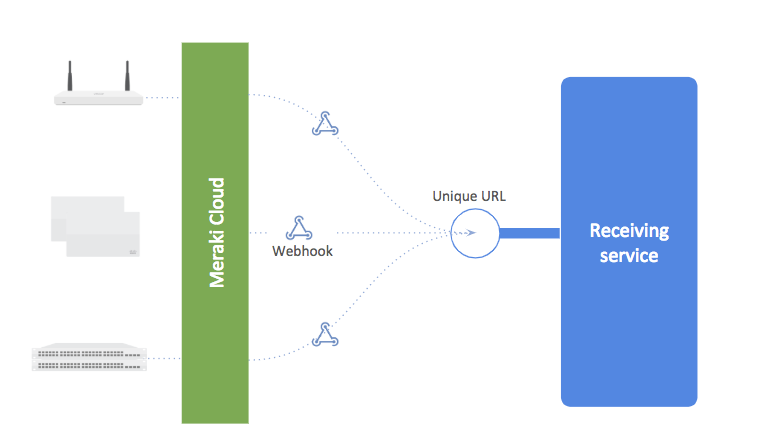
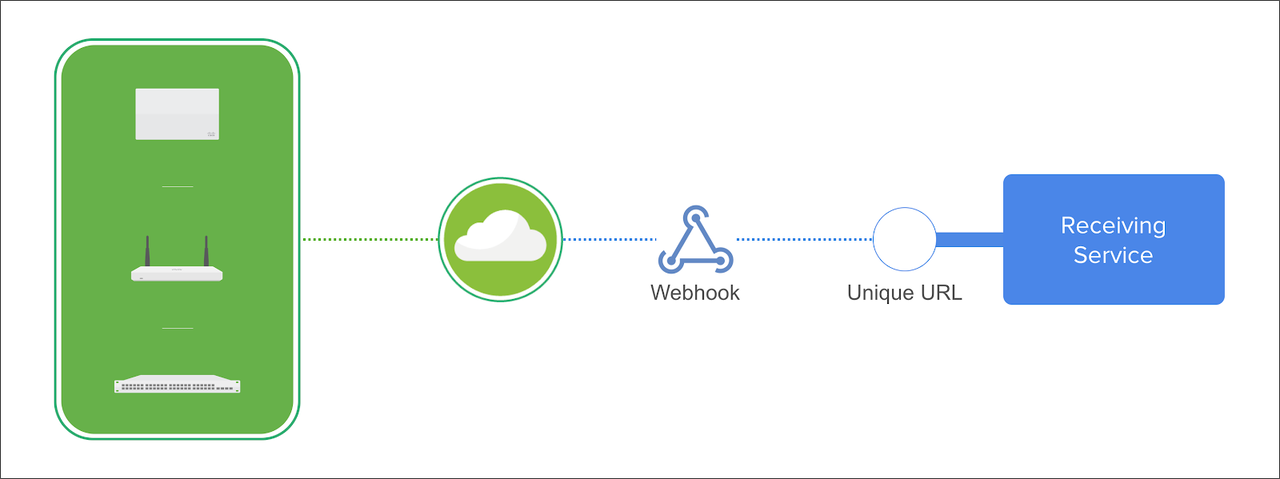
A Meraki webhook operates as a lightweight communication mechanism between the Meraki Cloud and your external systems. When a configured event takes place, such as a device going offline or a WAN uplink failing, Meraki immediately generates an alert. This alert is then pushed to your designated webhook URL in JSON format. Meraki webhook alerts are delivered via HTTP POST requests to a unique URL on your HTTP server, enabling real-time, event-driven notifications.
These webhook payloads are structured to be both machine-readable and human-readable. They include relevant metadata, timestamps, device details, and alert categories. Since the alert is pushed directly to your system, there’s no need for polling or API requests. It’s event-driven and efficient.
Your webhook receiver can be any HTTPS-accessible endpoint. This could be a serverless function, a backend service, or even a webhook-handling platform like Zapier or n8n. The key requirement is that it must support HTTPS, as Meraki does not send payloads to non-encrypted endpoints. Each webhook configuration should use a unique URL for targeted alert handling.
Meraki alerts are system notifications that can be configured in the Meraki Dashboard under Network-wide > Configure > Alerts. These alerts can be sent via email and as JSON messages to webhook endpoints, allowing you to automate network management tasks.
The Meraki webhook system supports nearly all the alert types available in the Meraki Dashboard under Network-wide > Configure > Alerts. When you enable webhooks, these alerts are sent both via email (if selected) and to your configured webhook endpoints.
Meraki webhook alerts are a feature that enables real-time, event-driven notifications for network alerts. When specific conditions are met, these alerts send HTTP POST requests to your custom URLs, allowing seamless integration with other services for immediate incident response and automation.
Some common events you can subscribe to include:
These alerts apply across product lines including MX firewalls, MR wireless access points, MS switches, and MV cameras. Whether you’re managing switches, firewalls, APs, or cameras, the webhook system gives you a unified method for real-time monitoring.
Each alert payload contains enough context to initiate automated workflows or log the event to your SIEM or dashboard. The payload template is a structured JSON object that includes a description of the alert, the alert type, network and device identifiers, and relevant event details, providing clarity and guidance for integration with your systems. By customizing which alerts are enabled and which recipients are assigned, you gain fine-grained control over your monitoring architecture.
Meraki webhooks offer several advantages for organizations that require agile and responsive network operations.
First, they allow for immediate visibility. There is no waiting for periodic reports or administrator reviews. Alerts trigger in near real-time, so problems are detected as they happen.
Second, webhook alerts can feed into automation pipelines. A webhook can trigger:
This reduces manual intervention and improves consistency. It also helps service providers support more clients with fewer resources.
Finally, Meraki webhooks are lightweight and scalable. Since they are pushed only when events occur, there’s minimal bandwidth or CPU usage. They’re also compatible with any language or framework that can accept HTTPS POST requests.
Webhook data can also be integrated into automated reporting systems, enabling real-time and historical analysis of network events for comprehensive monitoring and troubleshooting.
Setting up a Meraki webhook is a simple process through the Dashboard.
You can organize your API requests and webhook payload templates into a collection for easier management and sharing.
Once saved, this URL can be selected as a recipient for any of your network alerts. Just check the box next to your webhook when configuring alert types. You can use the same receiver across multiple alerts or create different URLs for different alert categories.
During setup, make sure your endpoint is:
You can test your receiver with tools like Webhook.site or ngrok to ensure payloads are received correctly. If you prefer to build your own, frameworks like Flask (Python), Express (Node.js), or FastAPI offer fast deployment options. You can also use a Postman collection to test and manage your webhook API requests efficiently.
Security is critical when configuring webhooks. Since your server will receive traffic from the Meraki Cloud, you must control access and ensure integrity.
Start by allowing incoming connections only from Meraki’s known source IP ranges:
Update your firewall rules to accept inbound HTTPS traffic only from these IP blocks. You can also implement rate limiting to prevent abuse.
Consider additional safeguards:
When handling webhook payloads, remember that the data is transmitted as a JSON-formatted string. You may need to parse or convert this string for processing or storage, for example by using functions like ‘jsonify’ to handle JSON objects.
For advanced use cases, consider using an API gateway, reverse proxy, or service mesh to inspect and filter webhook traffic before it reaches internal systems. Webhook payloads can also be stored in external systems or databases for future reference, processing, or automation.
Deploying Meraki webhooks is more than just entering a URL in the Meraki dashboard—it requires thoughtful planning to ensure your network responds effectively to critical events and alerts. While the dashboard streamlines the initial setup, organizations should consider several factors to maximize reliability and operational value.
First, evaluate the stability and scalability of your webhook endpoint. Since Meraki will push alerts for every subscribed event, your receiving server must be able to process bursts of webhook traffic without delay or data loss. Consider implementing load balancing or failover mechanisms to maintain uptime, especially for mission-critical alerts.
Next, plan your alert routing strategy. The Meraki dashboard allows you to assign different webhook URLs to specific alert types, enabling you to separate high-priority events (like device offline or security threats) from routine notifications. This targeted approach prevents alert fatigue and ensures that the right teams are notified for the right incidents.
Monitoring and logging are also essential. Integrate webhook delivery status and event logs into your existing monitoring tools to track which alerts have been received and processed. This visibility helps you quickly identify and resolve any issues with your webhook setup.
Finally, thoroughly test your webhook configuration before going live. Use test events in the dashboard to validate that your endpoint receives and processes alerts as expected. Regularly review your webhook setup to adapt to changes in your network or business requirements.
By considering these deployment best practices, you can ensure that your Meraki webhooks deliver timely, actionable insights—empowering your team to respond to network events with confidence and precision.
A Meraki webhook can enhance visibility and automation across many environments. Here are a few practical examples of how IT teams and service providers use them today:
For MSPs managing dozens or hundreds of networks, webhooks reduce the need for manual monitoring. A device going offline or a WAN uplink failing can trigger an automatic ticket in a help desk system like Zendesk or ServiceNow. This ensures quicker response and helps meet SLAs without relying on human oversight.
Educational institutions and large corporate campuses often need alerts for physical security or infrastructure changes. A webhook can trigger when a motion alert is detected on an MV camera, notifying security teams via Microsoft Teams or triggering an NVR recording session.
Any configuration change in the Meraki Dashboard, such as new VLANs, SSID modifications, or security policy updates, can be sent via webhook. This allows integration with GitOps-style audit systems or internal change management tools, keeping the network configuration traceable and compliant.
These use cases show how Meraki webhooks fit seamlessly into real-world automation and monitoring strategies.
While Meraki webhooks are straightforward to configure, a few issues can prevent them from working properly. Here’s what to watch out for:
If your receiving server is behind a firewall, it must allow incoming HTTPS traffic from the Meraki Cloud IP ranges. If these rules are missing, Meraki won’t be able to reach your endpoint, and alerts will silently fail.
Meraki requires webhook receivers to use HTTPS. Any non-secure (HTTP) URLs are rejected. Additionally, the server’s SSL certificate must be signed by a trusted certificate authority.
Sending all alerts to a single receiver without filtering can overwhelm systems and lead to alert fatigue. Start with a few high-priority events (e.g., device offline, WAN failover) and gradually expand. Use different webhook endpoints or tags to separate categories and prevent overload.
Avoid these pitfalls to build a reliable, event-driven architecture for your Meraki deployment.
Webhooks are not just for notifications—they’re triggers for powerful automation workflows. By pairing Meraki webhooks with scripting environments or third-party tools, you can create event-driven architectures that adapt and respond automatically.
Here’s a typical workflow:
This level of automation reduces response times and enforces consistent security policies. Popular tools for orchestrating such flows include:
You can also use Meraki webhooks as input for real-time dashboards that track uptime, alert frequency, and device health across large environments.
A Meraki webhook enables your network to respond in real-time. By pushing structured alerts to your own systems, you can automate responses, reduce downtime, and gain deeper visibility. From monitoring and alerts to orchestration and remediation, webhooks enable faster, smarter network operations.
At Stratus Information Systems, we help organizations deploy Cisco Meraki solutions that go far beyond default settings. Whether you’re integrating with ITSM platforms or building automated incident response pipelines, our engineers can guide you every step of the way.
Get in touch today to explore how Meraki webhooks can transform your network visibility and automation strategy.